




SBI WhatsApp Banking services now solves all your Banking queries easily. With the digital revolution, people are now looking for easier and faster ways to manage their banking transactions. State Bank of India (SBI), the country’s largest public sector bank, has introduced a new way to check your account balance without having to go to an ATM or visit a bank branch.
SBI users can now check their account balance in WhatsApp, the popular messaging app. In this article, we will guide you on how to check your SBI account balance on WhatsApp and the benefits of using this service.
What is SBI WhatsApp Banking?
SBI WhatsApp Banking is a service offered by State Bank of India that allows its customers to check their account balance, mini statement, and more through WhatsApp. With this service, you can access your bank account without leaving your home. The service is available 24/7, and you can use it anytime you want.
How to Register for State Bank of India WhatsApp Banking?
To use the State Bank of India WhatsApp Banking service, you must first register for it. Here’s how you can register for WhatsApp Banking:
Step 1: Save SBI WhatsApp Banking Number – +919022690226 – on your mobile phone.
Step 2: Open WhatsApp and search for SBI WhatsApp Banking number. Once you find it, click on it and send a message saying “HI.”
Step 3: Follow the instructions given by the Chat-Bot.
Step 4: After the registration process is complete, you will receive a confirmation message from SBI.
Step 5: Click on “Get Balance” to check your current account balance.
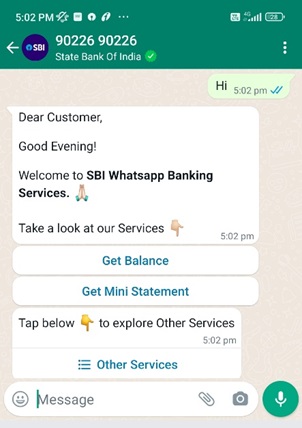
Benefits of Using State Bank Of India WhatsApp Banking
Many benefits of using state Bank Of India WhatsApp Banking, including convenience, accessibility, and security.
- Easy and Convenient: You can check your account balance, mini statement, and more from the comfort of your home without having to visit a bank branch or ATM.
- 24/7 Service: WhatsApp Banking is available 24/7, which means you can use it anytime you want.
- No Internet Required: You do not need an internet connection to use state bank WhatsApp Banking. All you need is a smartphone with WhatsApp installed.
- Secure: State Bank Of India WhatsApp Banking is a secure service. Your account information is kept confidential and is not shared with anyone.
State Bank of India WhatsApp Banking is a convenient and secure way for SBI customers to access their bank accounts. By following the simple registration process, customers can check their account balance and mini statement on WhatsApp. The service is available 24/7 and does not require an internet connection, making it an ideal way for customers to stay updated on their account activity. With SBI WhatsApp Banking, banking has become more accessible, and customers can manage their finances more efficiently.
YOU MIGHT ALSO LIKE IT
Trending Searches Today | SBI WhatsApp Banking: How to Register for SBI WhatsApp Banking
- 9 Best Home Remedies for Dry Cough: Natural Ways to Find Relief
- IPL 2023: Batting with Kohli was just fantastic, says Chris Gayle
- Electric Tariff In Odisha: No increase in tariff, 4% Rebate On Digital Payment
- Bhupender Yadav Launched Aravalli Green Wall Project, Tikli village near Gurugram
- NHAI Uses Steel Slag in Road Construction on Trial Basis
- Lava Blaze 5G | 50MP Camera | 128GB ROM | 90Hz
- Income Tax Return Forms for Assessment Year 2023-24 in advance